
The Heat Pump Savings Calculator That Turns HVAC Website Visitors Into Booked Estimates
Homeowners want the number before they want a salesperson. This two-minute heating cost calculator gives it to them — current spend versus three heat pump options, in their own numbers — then hands your rep a fully profiled lead and the homeowner a $250 reason to book.
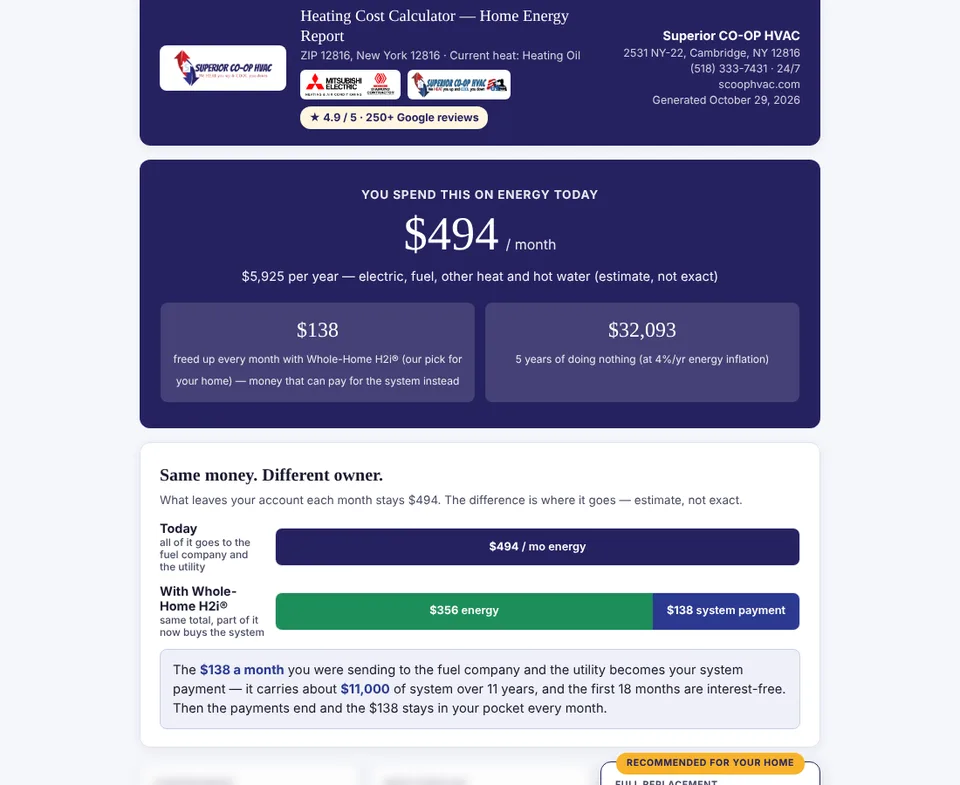
The short answer: A heating cost calculator on an HVAC website does something no contact form can: it shows a homeowner, in their own numbers, what their current system costs them every month and what a heat pump would cost instead. The version we built for Superior CO-OP HVAC at scoophvac.com takes about two minutes, pulls home details from the street address, prices fuel by ZIP code, compares four scenarios and ends with a personal report and a $250 code redeemable at the estimate. Every completed report lands in the CRM with the home’s full profile, so the sales rep walks in already knowing the house. Media Pillars builds the same tool, branded and tuned, for HVAC companies anywhere.
If you sell heat pumps, your hardest sale is not against another contractor. It is against “maybe next year.” The calculator exists to put a dollar figure on next year.
Why “Get a Free Estimate” stopped working as a website call to action
A free estimate asks a homeowner for an hour of their evening and a stranger in their kitchen before they have any idea whether the numbers make sense. The people who fill that form out are already sold or are shopping three quotes on price. Everyone in the middle, the homeowner who is tired of $900 oil deliveries but not sure a heat pump works in their climate, leaves your site and keeps paying the oil company.
Those middle visitors are the biggest group on any HVAC website, and they are the ones who respond to a tool. They want the number first. Give it to them in exchange for an email, and you have a lead who self-qualified on cost, timeline and system age before anyone picked up a phone.
How the HVAC savings calculator works, screen by screen
Screen 1: Your home
The homeowner enters a ZIP code, and optionally a street address. With an address, the calculator looks up public property data in the background: square footage, number of stories, year built and other details. It shows a green “we found your home” card the homeowner can accept or undo. Year built becomes an insulation estimate. Nobody has to guess their square footage.
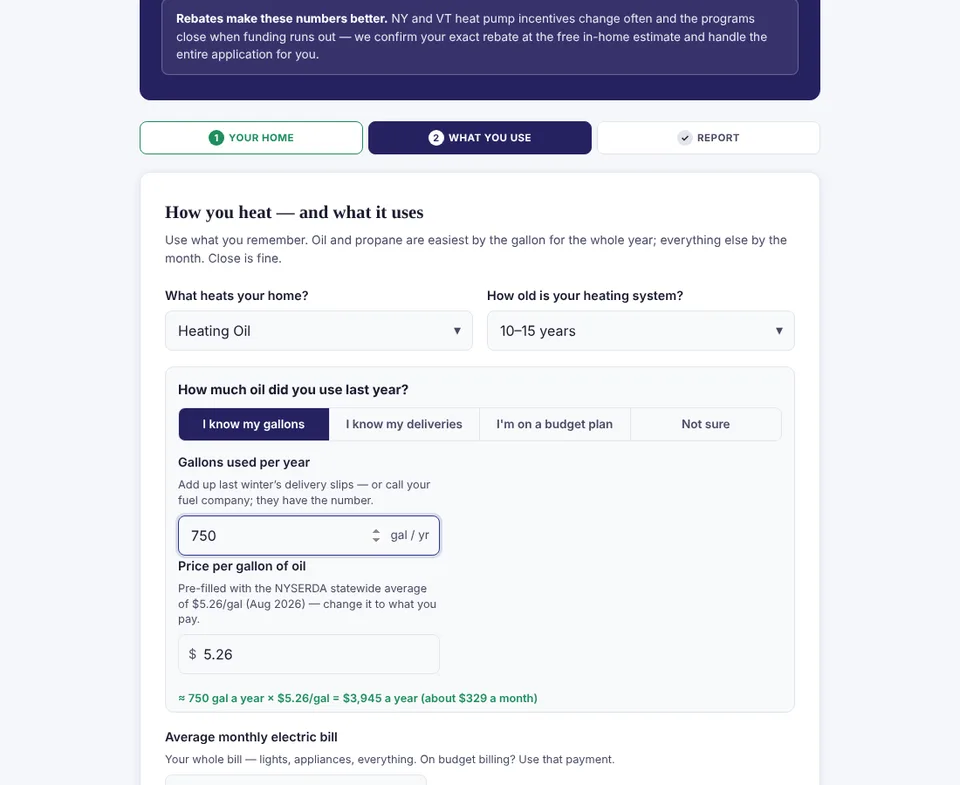
Screen 2: What you use
Heating fuel (oil, propane, natural gas, electric baseboard or an older heat pump), system age, the monthly electric bill and the fuel used per year. Fuel prices default to current local numbers by state and ZIP, so a homeowner who does not know their price per gallon can still finish. It also asks about secondary heat like wood stoves, pellet stoves and space heaters, because in rural markets those are a real part of the heating bill. Comfort problems such as cold bedrooms, a room over the garage or a hot upstairs get checked off for the report and for the rep.
Screen 3: The report
The homeowner sees what they spend on energy today, per month and per year, and four options side by side:
Each option shows monthly cost, cost per million BTU so fuels compare apples to apples, and the five-year cost of doing nothing with energy inflation built in. Then comes the line that moves people: same money, different owner. What leaves their account each month stays about the same, but part of it now pays for a system they own instead of going to the fuel company.
The lead capture: why the full report is gated and the teaser is not
The headline numbers show on screen with no form. That is deliberate. Making someone hand over their phone number before they see anything kills completion. Once they have seen a number worth caring about, they unlock the full report with their name, email and phone, plus two questions that sort the lead:
- Timeline: how soon they are thinking about a change.
- Contact preference: “call me” or “just email me the report.”
The full report arrives by email immediately, and the report generates a unique $250 code to hand the sales rep at the free estimate. That code is real, it is printed on the report, and it requires no extra automation on your side.
What happens on the back end after someone finishes the calculator
- The contact is created in your CRM with every answer as a field: fuel type, system age, square footage, year built, monthly cost, every scenario result, comfort problems and secondary heat.
- The homeowner gets the full report by email, branded with your logo, reviews and phone number, mirroring what they saw on screen.
- “Call me” leads become hot-lead alerts to the office with the contact details, the property profile, the current system and the numbers table, so whoever calls back sounds prepared.
- “Email only” leads go into a 90-day education sequence of six emails: the one number that matters, the rebate window, cold-climate proof, the hybrid path, what an estimate looks like and a heating-season final note. Every email respects the no-call promise.
- The lead lands in a calculator pipeline so you can see how many reports turned into estimates and how many estimates turned into installs.
The calculator works before the estimate too, not just as a lead magnet
This is the part most HVAC companies never think of. When Superior books an in-home estimate, from any source, the homeowner automatically gets a text and email inviting them to run the calculator before the appointment, with the $250 code as the reason to do it. The rep gets notified when the report comes in. They show up already knowing the home’s fuel spend, square footage and problem rooms, and the homeowner has already seen the savings math in private, on their own time. The kitchen-table conversation starts at “which option” instead of “why would I.”
It installs on the phone like an app
The calculator is built as an installable web app. On Android it offers a one-tap install; on iPhone it shows the Add to Home Screen steps. Homeowners can keep it on their phone and re-run their numbers when fuel prices change. App launches are tagged so they show up separately in Google Analytics.
Accuracy rules we hold the calculator to
A savings tool that overpromises gets your reps in trouble at the kitchen table. These are the rules this one follows:
- Every figure is labeled as an estimate. The screens say so plainly.
- Electricity is priced at realistic marginal rates for the service territory, not the cheapest number available.
- Furnace and boiler electricity is counted by system age, because old equipment burns a surprising amount of power that homeowners never attribute to heating.
- No expired incentives. The federal 25C heat pump tax credit ended December 31, 2025. The calculator does not mention it. Rebate copy points homeowners to the free estimate, where current programs are confirmed.
- A failed web request never blocks the report. If the CRM connection hiccups, the homeowner still sees their numbers.
Can I just buy a calculator plugin for my HVAC website?
You can, and for a very simple payback calculator a plugin is fine. What a plugin will not do is pull property data from an address, price fuel by ZIP code, model hybrid and single-zone scenarios, write every answer into your CRM as separate fields, branch “call me” from “email me,” run a 90-day sequence, issue a redeemable discount code and invite booked estimate customers to fill it in before the visit. The calculator is the front end. The value is in what happens to the lead afterward.
Does this only work for heat pump contractors?
The Superior version is built around cold-climate Mitsubishi heat pumps because that is their core sale, and it compares oil, propane, natural gas and electric heat. The same engine adapts to other goals: a furnace-plus-AC replacement comparison, a hybrid dual-fuel pitch, a ductless add-on for one room, or a boiler replacement. Brand names, equipment efficiencies, fuel defaults and incentive copy are set per company and per state.
What it costs and how to get one
The calculator is built and branded per HVAC company, connected to your CRM and lead routing, and maintained as part of a monthly plan, because fuel prices and incentive programs change every season. It pairs naturally with the Get Found Everywhere and Market Leader plans, which bring the traffic. Every plan price is on our pricing page; the calculator build is quoted after a walkthrough so we can match it to what you sell. Run the live version at scoophvac.com/calculate/ to see exactly what your customers would see.
Part of our HVAC systems series: AI receptionist that books into Housecall Pro, estimate builder and estimate tracking, HVAC website design and CRM automation with Housecall Pro.
Screenshots are from the live calculator on scoophvac.com using a sample oil-heated home in ZIP 12816; figures are the tool’s estimates for that sample, not a customer result. Disclosure: Media Pillars founder Frank Davis is also Sales & Marketing Manager at Superior CO-OP HVAC.
Frequently asked questions
What is an HVAC savings calculator?
It is an interactive tool on an HVAC company’s website that estimates what a homeowner spends on heating and cooling today and what they would spend with different heat pump options. A good one uses local fuel prices, home details and realistic efficiency figures, and captures the lead when the homeowner unlocks the full report.
Does a heating cost calculator generate more HVAC leads than a contact form?
It reaches a different and larger group: homeowners who are researching and not ready to schedule an estimate. They will trade an email for their own numbers. Each completed report also carries the home’s fuel type, system age, size and problem rooms, so the lead arrives qualified.
How accurate are heat pump savings calculators?
They are estimates and should say so. Accuracy depends on local fuel and electricity prices, the home’s size and age, the existing system’s efficiency and the heat pump’s cold-climate performance. The Superior calculator uses ZIP-based fuel prices, realistic marginal electricity rates and counts the electricity an old furnace or boiler uses.
Can the calculator connect to my CRM?
Yes. Every answer and result is written to the contact record as its own field, call-me leads trigger a hot-lead alert to the office, and email-only leads enter a 90-day education sequence.
Does the calculator mention the federal heat pump tax credit?
No. The federal 25C energy efficient home improvement credit expired on December 31, 2025. Rebate copy points homeowners to state and utility programs confirmed at the free estimate.
Can the calculator be customized for my HVAC company?
Yes. Branding, equipment lines, efficiency figures, fuel defaults, states served, incentive copy, the discount offer and the follow-up emails are all set per company. The engine can also compare furnace and AC replacements or dual-fuel systems.
Does ChatGPT recommend your business — or your competitor?
Free 30-second check on ChatGPT, Perplexity and Gemini. Your score on screen, a PDF report in your inbox, and the exact fix.
See it answer a call before you decide
Call or text the AI line, or chat right here. It will book your 15-minute walkthrough on its own — that's the demo.