
How to Claim Your Business in ChatGPT: Business Hub Steps, Who Qualifies and What You Get
OpenAI opened Business Hub on November 10, 2026. Here is what the ChatGPT business claim is, who can use it today, the exact steps, and an honest list of what you get from it and what you do not.
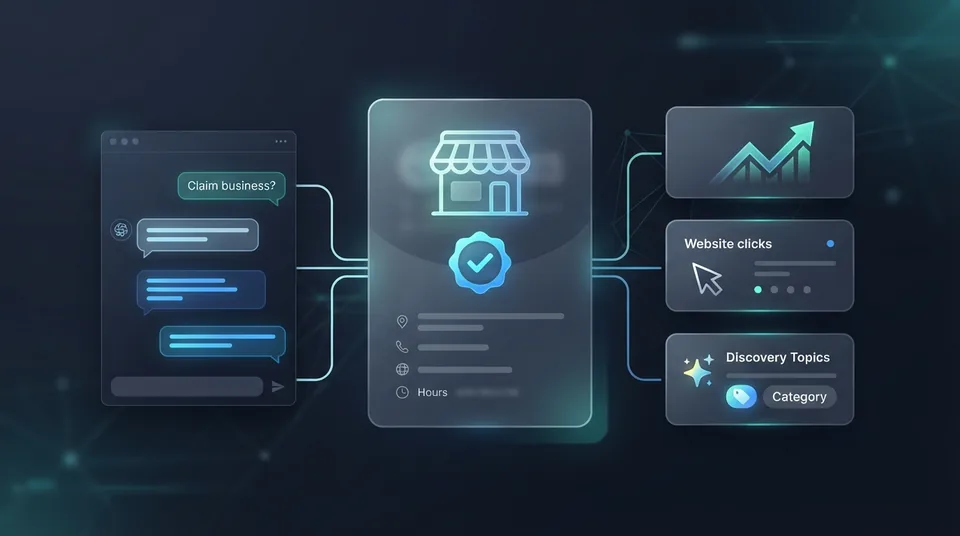
The short answer: To claim your business in ChatGPT, sign in to ChatGPT with an account your business owns, open Business Hub from the sidebar (or go to chatgpt.com/business-hub), search for your business, and verify it with a code sent to your business phone or email, a TXT record on your website domain, or your Shopify store. After OpenAI approves the claim, you complete an identity check through Persona. Once that is approved you get a blue check, you can correct your business details, and you can see how often ChatGPT mentions you and sends people to your website.
- What it is: “Businesses in ChatGPT,” an OpenAI beta launched November 10, 2026. The dashboard is called Business Hub.
- Who can claim: an owner or authorized representative of an eligible business. Availability depends on location and business type.
- Local stores and restaurants: can currently claim only a listing that already exists in the United States.
- Cost: OpenAI's setup guide lists no fee. No Ads account or Enterprise agreement is required.
- Two approvals: the business claim, then a personal identity check through Persona.
- What you get: a verified badge, editable business details, and 28-day insights on mentions, website clicks and discovery topics.
- What you do not get: a ranking boost. OpenAI says claiming does not change visibility in ChatGPT.
What is the ChatGPT business claim?
For three years, ChatGPT has described businesses using whatever it could find about them: the website, Google, directories, review sites. Owners had no way to say “that is my business, and that phone number is wrong.” Now there is one. OpenAI's announcement says ChatGPT is used by 1.2 billion people a week, and Business Hub is the place where a business can claim its profile, keep its information current, and see how people engage with it in ChatGPT.
When ChatGPT names a business in an answer, the user can open that business's profile. A claimed and verified profile shows a blue check and the details you supplied. An unclaimed one shows whatever ChatGPT assembled on its own.
The launch has two parts. Business Hub is the part that matters to almost every owner: claim, verify, edit, read insights. Business Agents are an optional add-on for certain online businesses, covered near the end of this article.
Is it the same as a Google Business Profile?
It is the same idea on a different platform, with one large difference: your Google Business Profile directly affects where you rank on Google, and OpenAI says a claimed ChatGPT profile does not affect where you appear in ChatGPT.
| Google Business Profile | ChatGPT business profile | |
|---|---|---|
| Where it shows | Google Search, Maps, AI Overviews, AI Mode | ChatGPT answers and the profile behind them |
| Who can claim | Nearly any business that serves customers | Eligible businesses; depends on location and type (beta) |
| Verification | Video, phone, email or postcard | Phone, email, website domain or Shopify, then a Persona ID check |
| What you control | Categories, services, hours, photos, posts, review replies | Website, description, category, logo, delivery and return policies, cover photo |
| Effect on ranking | Direct. It is the main local ranking input. | None, per OpenAI |
| Data you get | Calls, direction requests, searches, website clicks | Mentions, website clicks, discovery topics (28 days) |
So this is not a replacement for anything. It is one more profile to own, and it takes about twenty minutes of your time plus waiting on two reviews.
Who can claim a business in ChatGPT right now?
This is where most of the confusion is, so here is exactly what OpenAI's setup guide says and what it leaves out.
| Business type | Can you claim today? |
|---|---|
| Online store or online service with a website | Yes if eligible, wherever ChatGPT is available and verification is supported. You can claim an existing business or may be offered the option to add one. |
| Local store or restaurant | Only a listing that already exists, and only in the United States for now. |
| Local service business (HVAC, plumbing, electrical, law, insurance, salon) | Not spelled out. OpenAI says availability depends on location and business type. Search Business Hub and see whether your listing appears. |
| Multi-location business | Each location is claimed separately. There is no parent profile that claims every location at once. |
| Existing OpenAI Enterprise customers and advertisers | Work through your OpenAI representative. |
If you run a trade or a professional practice, do not wait for an article to tell you whether you qualify. Open Business Hub, type your business name, and you will know in one minute. If nothing comes up, skip to what to do if your business is not listed.
What you need before you start
- A ChatGPT account the business owns. Use a company email address. This account becomes the admin.
- Access to the business phone or email that appears on your listing, to receive a code. Or access to your domain's DNS settings. Or your Shopify login.
- A government-issued photo ID for the person completing the identity check.
- Your business registration details: legal name exactly as registered, registered address, and any registration or tax number. They have to match your official records.
- Proof you can represent the business if you are not the registered owner.
- Your profile content, ready to paste: website address, a plain two-to-three sentence description of what you do and where, your category, and a square logo file.
How to claim your business in ChatGPT, step by step
- Sign in with an account the business ownsGo to chatgpt.com and sign in with an email the business controls, such as owner@yourcompany.com. This account becomes the admin of the profile, so do not use an employee's personal login or your marketing agency's login.
- Open Business HubSelect Business Hub in the ChatGPT sidebar, or go straight to chatgpt.com/business-hub.
- Search for your business and pick the right listingType the business name into the search field and select the listing that matches your name and address. If you have more than one location, each one is claimed on its own.
- Prove the business is yoursPick one of the verification methods ChatGPT offers for your listing: a code sent to the business phone by text or automated call, a code sent to the business email, a TXT record added to your website's domain settings, or a Shopify store connection.
- Wait for the claim decisionOpenAI reviews the claim and emails you an approval or a request for more information. You can cancel the claim while it is under review.
- Pass the Persona identity checkSelect Verify with Persona and follow the prompts. Have a government-issued ID, your business registration details and proof that you can represent the business ready. Enter the legal business name exactly as it is registered and put your storefront name in the trade name field.
- Fix your profile and read your insightsOnce Persona is approved the blue check appears. Update the website, description, category, logo and policies, then open the insights to see mentions, website clicks and discovery topics for the past 28 days.
There are three gates, in this order: the claim, proof the business is yours, and proof of who you are. Claiming gets you into Business Hub. Persona approval is what unlocks editing, insights and the blue check. Many owners stop after the first approval email and wonder why they cannot change anything.
Which verification method should you pick?
ChatGPT only shows the methods available for your listing, so you may not get all four.
| Method | How it works | Best for |
|---|---|---|
| Business phone | Choose a text or an automated call, select Get code, enter the code sent to the number on the listing. | Any business whose listed number reaches a person or a phone that can read a text. Fastest option. |
| Business email | Select Get code. The code goes to the email associated with the business. | Businesses with a working info@ or office@ inbox someone actually checks. |
| Website domain | Add the TXT record ChatGPT shows you to your domain's DNS settings, then select Verify domain. | Businesses whose listed phone goes to an answering system. Can take a while to register. |
| Shopify store | Connect from the ChatGPT app in your Shopify admin, or choose Shopify store in Business Hub. | Shopify merchants. Your catalog carries over without a separate product feed. |
If you use the website domain method and you are not technical: you do not need to touch your website. The TXT record goes in the DNS settings at whichever company holds your domain (GoDaddy, Cloudflare, Namecheap, your web host). Copy the type, the host or name, and the value exactly as ChatGPT shows them and send them to whoever manages your domain. One common mistake: many DNS panels add your domain to the host field automatically, so typing the full domain again creates a record in the wrong place and verification fails.
If your business phone is answered by an AI receptionist or a phone tree, choose the text option, the email option or the domain option. An automated call that reads a code to another automated system gets you nowhere.
What can you edit once you are approved?
After both approvals you can update your website, business description, product or service category, logo, delivery policy, return policy and optional extras such as a cover photo. Stores can connect a product feed with prices and availability. OpenAI reviews changes before publishing them, so edits do not appear instantly.
Write the description the way an assistant would want to quote it: what you do, for whom, and where. “Smith Plumbing repairs and replaces water heaters, drains and well pumps in Glens Falls, Queensbury and Lake George” is useful. “Committed to quality and integrity since 1998” is not. Use the same name, address, phone and wording you use on your website and your Google Business Profile. ChatGPT may still pull from other sources, so anything that contradicts your profile elsewhere on the web still works against you.
What do the ChatGPT insights tell you?
For owners who watch their numbers, this is the best part of the launch. Until now, the only way to know whether ChatGPT was mentioning you was to ask it yourself or spot the occasional chatgpt.com visit in Google Analytics. Business Hub reports three things over the past 28 days:
- Mentions. For a local business, a mention counts each time ChatGPT shows a result for your location, even if nobody clicks. For an online business, it counts only when ChatGPT references your website. The brand name alone does not count.
- Website clicks. How often people click through from ChatGPT to your site. It does not measure calls, bookings or sales.
- Discovery topics. The common themes of the answers that mentioned you. You never see individual prompts or conversations.
Two cautions. Numbers only appear once activity passes a reporting threshold, so a blank tile does not mean nobody asked about you. And 28 days is a short window, so write the numbers down each month if you want a trend.
How to use it with the tools you already have: compare Business Hub website clicks to sessions from chatgpt.com in Google Analytics 4 (Reports, Acquisition, Traffic acquisition, then search for “chatgpt”). Compare discovery topics to the queries in Search Console. If ChatGPT mentions you for furnace repair but never for heat pumps, and heat pumps are where your margin is, you now know which page to write next. Our GA4 checklist covers the setup that makes this comparison possible.
What are the benefits of claiming your business in ChatGPT?
Here is what you can reasonably expect, without the hype that is already circulating.
- Accurate facts. You supply the website, description and category instead of hoping ChatGPT guessed right.
- A verified badge. A blue check tells the customer the profile belongs to the real business.
- First-party data. Mentions, clicks and topics straight from OpenAI, which no third-party tool can give you.
- Control of ownership. Your business is claimed by you, from your account, before anyone else tries.
- A way to delegate. You can add teammates and give an agency access without sharing a password.
- A head start. You are set up for whatever OpenAI adds to profiles next, while competitors are still finding out this exists.
- It does not raise your ranking. OpenAI says claiming or disputing ownership does not change visibility.
- It does not guarantee recommendations or give you control over ChatGPT's independent answers.
- It does not stop ChatGPT using other sources about you, right or wrong.
- It does not show you customer conversations. Insights are aggregated.
- It does not take bookings or payments.
- It cannot be undone easily. OpenAI Support cannot delete or hide a published profile.
My honest read: this is worth doing the week it becomes available to you, because it is cheap, it protects your name, and the data is new. It is also the smaller half of the job. A verified profile for a business ChatGPT never mentions is a verified profile nobody opens.
What actually gets your business recommended by ChatGPT?
The same things as before the launch. ChatGPT names businesses it can find, understand and verify from several sources that agree with each other:
- A complete, active Google Business Profile with the right categories and recent reviews
- A website with one page per service and per town, each stating plainly what you do and where
- LocalBusiness, Service and FAQ schema on those pages
- The same name, address and phone everywhere you are listed
- A steady flow of new reviews, each one answered
We wrote the full method in how to get your business recommended by ChatGPT, and the reasoning behind it in why AI assistants recommend some local businesses and ignore others. If you want to know where you stand today, the free AI Visibility Check asks ChatGPT, Perplexity and Gemini nine customer-style questions about your industry and town and shows who they named.
Seven mistakes to avoid
- Claiming from a personal or employee account. When that person leaves, your admin access leaves with them. Use a company address.
- Letting an agency be the owner. The business claims; the agency gets access. Never the other way around.
- Stopping after the first approval. No Persona approval means no edits, no insights and no blue check.
- Entering your storefront name as your legal name. The legal name must match your registration. Your “doing business as” name goes in the trade name field.
- Retrying while a review is pending. Wait for OpenAI's email.
- Forwarding a personal claim invitation. It is tied to the exact email it was sent to.
- Writing a description that disagrees with your website and Google profile. Contradiction is what makes an assistant pick someone else.
What if your business is not listed, or someone else claimed it?
Not listed: some eligible businesses are offered an option to add a business. Local stores and restaurants cannot add one yet. They can only claim a listing that already exists in the U.S. If there is nothing to claim, the useful work is the list in the previous section, because those sources are where a listing comes from. Then check Business Hub again once a month.
Already claimed by someone else: open the profile, select the three-dot menu, choose Dispute ownership, and verify through Persona that you represent the business. Before you do, ask around. It is often a former employee, a previous marketing company or your own office manager.
Listing shows “Contact support”: the listing is locked. Request access from OpenAI Support and include the step you were on, the error message and a screenshot.
Should your marketing agency claim it for you?
No. The owner or an officer of the business should make the claim and pass the identity check, because OpenAI is verifying a real person's ID against the business's records. After that, the admin can add teammates and grant agency access inside Business Hub. Each person signs in with their own ChatGPT account, and you can remove access at any time.
That is how we handle it at Media Pillars. You make the claim from your own account and complete the ID check. We prepare the description, category and logo so they match your website and Google Business Profile, add the DNS record if you verify by domain, and then keep the profile current and read the insights next to your Google Analytics and Search Console numbers through agency access. It is part of the AI search work in our AI Visibility programs and the Get Found Everywhere plan.
What about ChatGPT Business Agents?
A Business Agent is an AI representative of your company that a customer can chat with inside ChatGPT, in a clearly labeled conversation separate from their main chat. It is optional and, for now, limited to eligible ecommerce and online service businesses in the United States that have a website and meet OpenAI's industry policy. A verified profile alone does not make you eligible.
An agent can explain your products and policies and link to your website. It cannot complete a purchase, make a booking or check an order. For a local service business the practical answer today is: claim the profile if you can, and keep answering your own phone, texts and website chat, because that is where the booking still happens.
Your 20-minute plan for this week
- Open chatgpt.com/business-hub and search for your business. Note whether it is listed and which verification methods appear.
- If it is listed, claim it from a company-owned account using the phone or email code.
- Gather your ID and registration details so the Persona check passes the first time.
- Write a three-sentence description that matches your website and Google Business Profile word for word on name, phone, services and towns.
- After approval, record your mentions, website clicks and discovery topics. Repeat on the same day each month.
- Run the free AI Visibility Check to see whether ChatGPT is naming you or a competitor, because that is the number the profile cannot change.
Want it set up correctly the first time?
Tell our assistant your business name and town. We will check whether your listing is claimable, what ChatGPT says about you today, and what to fix before you verify.
Frequently asked questions
Can I claim my business on ChatGPT?
Yes, if it is eligible. Since November 10, 2026, an owner or authorized representative can claim a business in ChatGPT through Business Hub at chatgpt.com/business-hub. Availability depends on your location and business type. Local stores and restaurants can currently claim only a listing that already exists in the United States.
Is it free to claim your business in ChatGPT?
OpenAI's setup guide lists no fee for claiming, verifying or using Business Hub, and it says you do not need a ChatGPT Ads account or a ChatGPT Enterprise agreement to claim an eligible business. The program is in beta, so check Business Hub for current terms.
Does claiming my business make ChatGPT recommend me more often?
No. OpenAI states that claiming a profile does not change its visibility in ChatGPT and does not guarantee more recommendations. Claiming gives you accurate details, a verified badge and data. Being recommended still depends on your website, Google Business Profile, reviews, structured data and consistent business information across the web.
Can a plumber, HVAC company, law firm or other local service business claim a ChatGPT profile?
Maybe. OpenAI's guide says availability depends on location and business type and names local stores and restaurants specifically, which can claim only an existing U.S. listing. It does not publish a list for trades and professional services. The test takes one minute: open Business Hub, search your business name, and see whether a listing appears and which verification methods it offers.
How long does ChatGPT business verification take?
OpenAI does not publish a timeframe and says review times vary. There are two reviews: the claim itself, then the Persona identity check. OpenAI emails a decision after each one. Wait for the email before retrying.
What does the blue check on a ChatGPT business profile mean?
The blue check is the verified badge. It appears only after your Persona identity verification is approved. Claiming the business alone does not add it.
What if my business does not show up in Business Hub?
Eligible businesses may see an option to add a business where ChatGPT is available and verification is supported. Local stores and restaurants can currently claim only an existing U.S. listing, so there may be nothing to claim yet. Use the time to make your website, Google Business Profile and directory listings agree, because those are the sources ChatGPT reads.
Someone else already claimed my business in ChatGPT. What do I do?
Open the business profile, select the three-dot menu, choose Dispute ownership and verify through Persona that you represent the business. If the listing shows Contact support, it is locked and you need to request access from OpenAI Support.
Can my marketing agency claim my ChatGPT business profile for me?
The claim should be made from an account the business owns, and the person managing it has to pass an identity check. After that, the admin can add teammates and grant agency access inside Business Hub, with each person using their own ChatGPT account. That keeps ownership with you if you ever change agencies.
Is ChatGPT Business Hub the same as Google Business Profile?
No. They are separate systems run by different companies. A Google Business Profile feeds Google Search, Maps and Google's AI answers and directly affects local ranking. A ChatGPT business profile lets you verify and correct what ChatGPT shows and see ChatGPT mention data, and OpenAI says it does not change visibility. You need both, and the Google profile still does more of the work.
Can I delete or hide my business profile in ChatGPT?
Only unpublished drafts can be deleted. OpenAI says its support team cannot delete, unpublish or hide a published profile through a setup or ownership request.
What is a ChatGPT Business Agent, and can a local business have one?
A Business Agent is an AI representative of your business that customers can chat with inside ChatGPT. It is optional and currently limited to eligible ecommerce and online service businesses in the United States that have a website. It can explain products and policies and link to your site, but it cannot take bookings, complete purchases or check orders.
Sources
Facts in this guide come from OpenAI's own pages, read on November 21, 2026: the announcement Introducing Businesses in ChatGPT and the help center guide Setting up your business on ChatGPT. The program is in beta and OpenAI is changing it as it goes. We will update this page when eligibility for local service businesses changes.
Does ChatGPT recommend your business — or your competitor?
A claimed profile only helps if ChatGPT names you. See who it names today: your score on screen and a PDF report in your inbox.